Wednesday, February 08, 2006

Online PodcastUser Magazine Debuts

In what is a solid first issue, PodcastUser magazine has launched with discussions of all things podcasting. It appears to be a product of England and a bit Apple-centric, but I love british humor and my iPod so that's OK. The magazine covers material of interest to newbies and old hands -- from reviews of mixers and microphones, to podcast reviews, to how to get your podcast subscription feed going PodcastUser magazine looks very promising.

The magazine is currently available as a free PDF download and should be helpful to laboratorians working to offer teaching and training materials as podcasts.

Drag the orange icon to your aggregator to subscribe to PodcastUser.

Tuesday, February 07, 2006

Vlog It! Released

Serious Magic has finally released their new vlogging tool, Vlog It!, for immediate purchase via electronic software download (ESD). The CD version will be available for shipping shortly.

Vlog It! is a terrific application for those who wish to easily add video content to their blog.

I was a beta tester for the product and I can assuredly state that at $49 it's a bargain.

Watch my video preview of the trial version in iPod format HERE.

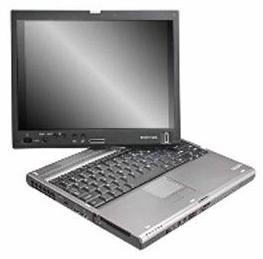
New Toshiba Tablet Almost Hits Home Run

Toshiba today officially made their new Portege M400 Tablet PC, the replacement for their popular Portege M200, available for order.

The unit has a near perfect weight and form factor for a tablet PC thats offers easy convertibility from notebook computer format to tablet -- at 4.5 pounds, students and healthcare professionals will find the M400 easy to carry throughout a long and busy day.

The tablet PC can be ordered with Intel's new Solo (single core) or Duo (dual core) processors, up to 2 GB of system RAM and a hard drive up to 120 GB in size.

Unfortunately, those who work with digital video and large image files will be disappointed to learn that the M400 offers only an integrated Intel graphics solution that shares system RAM; in other words, Toshiba has decided not to offer optional nVidia or ATI graphics chips with dedicated graphics RAM. In my view, this is a huge error in judgement by management. In addition, the Microsoft Windows Vista Upgrade is expected to release in Fall 2006 with increased demands on graphics hardware making the purchase at this time of a unit with an integrated or shared RAM solution somewhat questionable.

While the base M400 is priced fairly reasonably, a beefed up M400 with dual core processor, a GB of RAM and large, fast hard drive quickly breaks well over the $2,000 mark.

Personally, I will wait unti Vista ships before I buy a tablet PC -- there should be lots of updated tablets introduced at that time -- perhaps even a "M600" with stronger graphics processing.

However, for those who will use their tablet for modest content creation the Toshiba Portege M400 with its light weight and excellent form factor is worth considering.

Monday, January 30, 2006

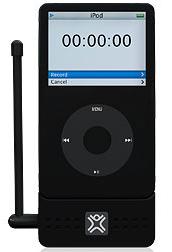
Record Teleconferences To iPod 5G

XtremeMac has announced what looks to be a very useful accessory for the 5th generation video-capable iPod. The MicroMemo is a small device that plugs into the base of a 5G iPod and allows attachment of any 3.5 mm microphone or line for capturing 44 KHz/16 Bit - high quality recordings of teleconferences, meetings or just about anything. A removable mic with flexible neck is included. Built-in speakers allow playback to a group.

This is one of the first mic recording accessories to be announced that exploits the high-fidelity capabilities if the new iPod. Previous iPods were capable of only 8 Bit recording.

Now teleconferences, meetings and continuing education, once recorded digitally, can be stored and distributed (podcasted) in a high quality format. No more cassette recorders in the conference room, please!

MicroMemo is expected to be available in the spring at a suggested retail price of $79.95.

Sunday, January 29, 2006

SnagIt 8 Released

SnagIt is a wonderful screen capture utility that is inexpensive, powerful and easy to use. Techsmith recently released a new version of the application that enhances the user interface and adds several great new features.

SnagIt, in my view, is an indispensible for creating instructional content. One can capture entire Web pages with active hyperlinks, application buttons, dialog boxes, user-defined regions, edit the objects, add interactivity and even publish the project to PDF.

Although designed primarily as a "still" capture and editing utility, SnagIt has a rudimentary ability to perform "video" captures of screen activity. I prefer using Camtasia Studio for video captures, but those on a tight budget might find SnagIt's ability in this area to be adequate for their needs.

Laboratorians will find SnagIt! useful when writing procedure manuals as screen shots can be taken of specimen login, culture workups and test reporting for insertion into bench procedures. HIPAA compliance can be maintained through the use of built-in editing features which allow fast and easy removal or masking of patient information. Research and test validation efforts can be enhanced through capture of vendor and reference Web pages, including active hyperlinks, and saved as PDF for filing or collaberation with colleagues through email attachment.

SnagIt is available in a free trial version HERE.

Techsmith maintains a support blog, The Visual Lounge, that is full of useful information HERE.

Drag the orange icon to your aggregator to subscribe to Techsmith's The Visual Lounge blog.

ASM Launches Video Podcast

The American Society for Microbiology will launch a weekly video podcast formatted specifically for the iPod, but also viewable on most desktop computers. The podcast is essentially excerpts from a PBS series called Intimate Strangers: Unseen Life On Earth.

Drag the orange icon to iTunes or your aggregator to subscribe to Intimate Strangers: Life On Earth.


Saturday, January 28, 2006

Canon Digital Rebel and Flash Microscopy

Ken Vernon discusses his photomicroscopy work using a common and inexpensive Canon Digital Rebel SLR. He also describes adapting electronic flash lighting to obtain superior images. A very good read.

Tuesday, January 24, 2006

Excellent OneNote 2003 Overview Video

Chris Bertelson is a widely experienced OneNote user and trainer. In a 45-minute video presentation, he discusses the basics of using OneNote 2003 as well as several tips for more experienced users.

OneNote has huge potential in laboratory medicine. As a single facility to organize and store all one's notes, information never gets lost or misplaced. Applications include research and test method validations, inventory, library and Web searches for relevant documents, quality control documentation, etc. Notes can be augmented with digital images, video, audio and screen clips.

When combined with a tablet PC, OneNote brings its functionality to a platform that can be carried and written upon like a clipboard with paper.

All educators, particularly those in healthcare, should be seriously looking at deploying tablet PCs with OneNote to both instructors and students.

Thursday, January 19, 2006

Vlog It! Release Delayed

While at CES, Serious Magic demonstrated their new vlogging tool Vlog It! and discovered that there might be an issue with the program's functionality and some of the features offered by new digital video cameras also on display at the event. Rather than follow through with a formal release of Vlog It! at CES, Serious Magic made the decision to not begin sales long enough to address these issue.

Once the program is offered for sale, a full review will be posted.

Sunday, December 04, 2005

90-Second Vlog It! Preview iPod Version

The iPod version of my 90-Second Vlog It! Preview has been posted here. To place the video on your iPod, right click the image to the left and choose "Save Target As...". Once the file is on your computer one can either drag it into iTunes or select File : Add File To Library. The next time one syncs the iPod the file will appear under Videos : Movies. The picture and sound quality of the piece on the iPod is quite good, although the file size is larger than what I can get using Windows Media Encoder and equivalent quality settings. Video podcasting (vodcasting) requires a host with a liberal policy on account bandwidth.

Vlog It! doesn't currently publish to "iPod Format" and the application is not intended to offer AVI output. Vlog It! is based on Visual Communicator so I brought the Vlog It! project file into VC and published to AVI. I then opened the AVI in QuickTime Pro 7 and exported to iPod format.

It's nice to know that one can go back and forth with project files between VC and VI.

Many have suggested to Serious Magic that a "Publish to iPod" or "Publish to QuickTime" feature be added to both Vlog It! and the Visual Communicator line. Serious Magic has a very good history of implementing user suggestions, so perhaps native iPod publishing will become a feature in a future product upgrade or patch.

This site will very soon be offering a series of vodcasts in formats for both the 4:3 iPod and 16:9 Windows Media-capable devices. Of course, a portable video device is not needed to view the vodcasts as one may simply watch them on the desktop.

Sunday, November 20, 2005

Vlog It! Free Trial 90 Second Preview

Vlog It! is a new vlogging tool that promises to make vlogging a trunkey operation for many users. The application has been in public beta, but is now available in a "free trial" form. Final release of the program is expected before the end of November with a suggested retail price of $49.95.

Vlog It! is essentially an encarnation of Visual Communicator that has been "feature-focused" and "publishing-enhanced" for the task of vlogging.

My initial impression of the program is very favorable. One easily creates a "talking head" video supplemented with digital pictures and video clips that one wishes to show to the vlogging community. Visual Communicator, of course, can already do this and offers many more features. The BIG news about Vlog It! is that the technical aspects of vlogging are adeptly handled by the program. Selecting an image clip for you video link is as easy as pushing a button. Publishing the video involves nothing more than dragging your image clip into your vlog editor. Poof! All the code and hyperlinking is handled by Vlog It!.

Vlog It! will also chromakey a green screen to whatever background you'd like -- in the video I used a stock "Tech" background that was included with Vlog It! Keep in mind that the green screen and lapel mic used in the video are not included with Vlog It!; however, they are inexpensive items that can be purchased from Serious Magic or any media content vendor. Professional lighting was not used, yet the program did a good job of keying the background.

I encouage all vloggers to download the trial version and take it for a spin. A 15-day Playstream account is included in the free trial. The free trial version is limited to Flash output; however, the shipping version of Vlog It! will also publish to Real and Windows Media formats.

Personally, I'd like to see the application be enhanced to include the option to "Publish to QuickTime" and specifically "Publish to iPod". I like to present my work in multiple formats from within one application -- would save alot of time over doing the "conversion shuffle" with a third party tool.

Saturday, November 19, 2005

One Note 12 Beta 1 Released

It's been a busy week, so this is the first post in a few days.

Microsoft has made available to its registered beta testers the first beta of One Note 12. For those unaware, the next version of Office is release 12 and should take place in the fall of 2006 along with the next version of Windows, Windows Vista. One Note 12 may or may not be packaged as an included component of the Office suite.

This is not a public beta.

However, the new features are discussed with some detail at the included link and its sub-links.

Very informative for all One Note and tablet PC users.

Thursday, November 03, 2005

Beta Test of Vlog It

This post is just a very quick and dirty test of the drag and drop publishing feature of the Vlog It! public beta from Serious Magic. More posts will likely follow as I become more familiar with the program.

Your video host info is placed into Vlog It! and the video is uploaded to the server away from Blogger during "Publish". One then only need drag a 'Thumbnail" (like the one you see hear) of the video from the publish dialog to the Blogger "Compose Field". Like magic, you're done as Vlog It! does most of the technical work for you.

The beta only offers Flash output in a popup window from the host server, but the final release will allow publishing in Windows Media or Real formats that you can configure to display viewing tools for the user.

At this point the beta is fairly well polished. Those interested in making their vlogging life easier should download the public beta from the Serious Magic web site: http://www.seriousmagic.com/products/vlogit/PublicBeta.cfm

Sunday, October 23, 2005

Technology in Medical Centers

A video interview from Microsoft Channel 9 that discusses many issues faced by medical centers when implementing technology solutions in healthcare. Wireless, tablet PCs, HIPPA and many other issues are discussed. This is an excellent video and may help you with "talking points" when working with funding resources needed to implement technology and move it forward.

Saturday, October 22, 2005

Video iPod Ordered

The new video-capable 30 GB iPod is available with an education discount at $269. This is not much more than the price of a 4 GB iPod nano, yet the new iPod has nearly eight times the storage capacity and the ability to playback video (either Quicktime of MPEG4; more formats would have been a plus, but I can live with the limitation).

The simple fact is that all students love the iPod.

Those who produce education content would be wise to exploit the universal appeal of the iPod. Lectures should be made available in audio MP3 format and either Quicktime or MPEG4 video formats. Delivery of audio and video content can be through a local network, optical media or through an Internet podcast (students do not actually need an iPod to hear or view a podcast -- content can be found on the Web using a Mac or PC and played on the computer, then transferred to any portable audio or video player).

I ordered an iPod the other day from the Apple online store and expect delivery next week. I've already begun to prepare content suitable for podcasting and will report on my progress in future posts.

My vision is to provide digital lectures in three formats: MP3, WMV and Quicktime. A master lecture is created as a lossless AVI file and then converted as appropriate to other file types.

Paperless teaching promises to save students and instuctors significant time.

White Paper: Tablets in Healthcare

It's been a busy couple weeks, but I've got a few moments free right now.

I ran across a white paper published by Motion Computing, a tablet PC vendor that specializes in the slate format or form factor of the tablet PC.

Although the paper is not written from the viewpoint of a laboratorian, it does contain information that might be useful in preparing one's own discussion regarding the advantages of tablet PCs in laboratory medicine.

Thursday, September 29, 2005

Photoshop Elements 4.0 Released

Adobe Photoshop Elements 4.0 is now available directly from Adobe or from Amazon.com.

I've used PE3.0 for some time and recommend it highly for those who need both an editor and file management system that is powerful, yet relatively inexpensive.

Version 2.0 of Premeire Elements will release on October 5th. I will wait until then and attempt to purchase an upgrade combination package of PE4.0 and PreE2.0 at a better price than the two upgrades individually.

Once I run them through their paces, I will post a review geared toward laboratorians.

Wednesday, September 21, 2005

Ovation for PowerPoint

As part of my work involves education and presentation of material, I use PowerPoint. The slides I create are used for traditional PPT presentations and for use in digital video creation.

I've been involved in the beta testing of a new PowerPoint tool called Ovation. This product is the work of Serious Magic, a California technology company that produces software for those who work with digital video.

While I can't discuss details of the product, I would like to suggest that all PowerPoint users seriously consider adding this tool to their presentation toolbox. It transforms your existing PowerPoint presentation into glorious renderings that feature smooth movement and animation unlike any PowerPoint tool I have used.

It will likely be available later this fall. As you may note on the Serious Magic website, most of their products are available to download in a trial version. I suspect that a trial version of Ovation will be available at launch and, if so, I encourage PowerPoint users to give the application a try.

Remember, Ovation is not available at this time -- it should release sometime this fall.

Sunday, September 11, 2005

Converting Mac PICT Images to PC Format

I've come across a collection of Gram stain images in Mac PICT format and have been looking for a batch tool to convert them to an image format that is workable on a PC.

The tools I've found and tried can't recognize the file type. I even tried to insert the PICT files into Word and let Word work it's internal conversion magic, but no joy. I'm beginning to suspect that perhaps the files are corrupted in some way.


I've spent a couple of hours so far on this project.

Next week I will ask a colleague at work if he can bring in his Apple Powerbook. I've give him the PICT files on a CD and see if he can convert them into a PC-friendly format -- such as JPEG or TIFF.

Saturday, September 10, 2005

Long Time No Blog

Been busy with various activities:

  1. Home construction projects.
  2. Club volleyball with daughter.
  3. Misys training in Arizona.
  4. Preparation of digital video student training materials.
  5. Software beta testing.
  6. Evaluating video-blogging options.
  7. Digital SLR macro and microphotography using Canon Rebel XT.
  8. Working with new CLS students.
  9. Did I mention home construction projects?

Will post updates nearly daily from now on. Yeah, well, we'll see, won't we?